2026 年 11 月 CSCA
Formal exam schedule
正式考试安排
下表为六个场次的考试日期与各科目开考时间,均为北京时间(UTC+8);身处其他时区的考生请自行换算为当地时间。
The table below lists the exam dates and subject start times for all six sessions, in Beijing Time (UTC+8) candidates in other time zones should convert to local time.
| 2026年11月场(11月14–15日)下午场Nov 2026 · 11月14–15日 · Afternoon sessions | ||
| 11月14日(首日) | 专业中文 Professional Chinese | 14:00–15:30 |
| 11月14日(首日) | 数学 Mathematics | 17:00–18:00 |
| 11月15日(次日) | 物理 Physics | 14:00–15:00 |
| 11月15日(次日) | 化学 Chemistry | 16:30–17:30 |
| 2026年12月场(12月19–20日)上午场Dec 2026 · 12月19–20日 · Morning sessions | ||
| 12月19日(首日) | 专业中文 Professional Chinese | 08:00–09:30 |
| 12月19日(首日) | 数学 Mathematics | 11:00–12:00 |
| 12月20日(次日) | 物理 Physics | 08:00–09:00 |
| 12月20日(次日) | 化学 Chemistry | 10:30–11:30 |
| 2027年1月场(1月23–24日)下午场Jan 2027 · 1月23–24日 · Afternoon sessions | ||
| 1月23日(首日) | 专业中文 Professional Chinese | 14:00–15:30 |
| 1月23日(首日) | 数学 Mathematics | 17:00–18:00 |
| 1月24日(次日) | 物理 Physics | 14:00–15:00 |
| 1月24日(次日) | 化学 Chemistry | 16:30–17:30 |
| 2027年3月场(3月13–14日)下午场Mar 2027 · 3月13–14日 · Afternoon sessions | ||
| 3月13日(首日) | 专业中文 Professional Chinese | 14:00–15:30 |
| 3月13日(首日) | 数学 Mathematics | 17:00–18:00 |
| 3月14日(次日) | 物理 Physics | 14:00–15:00 |
| 3月14日(次日) | 化学 Chemistry | 16:30–17:30 |
| 2027年4月场(4月24–25日)下午场Apr 2027 · 4月24–25日 · Afternoon sessions | ||
| 4月24日(首日) | 专业中文 Professional Chinese | 14:00–15:30 |
| 4月24日(首日) | 数学 Mathematics | 17:00–18:00 |
| 4月25日(次日) | 物理 Physics | 14:00–15:00 |
| 4月25日(次日) | 化学 Chemistry | 16:30–17:30 |
| 2027年6月场(6月26–27日)上午场Jun 2027 · 6月26–27日 · Morning sessions | ||
| 6月26日(首日) | 专业中文 Professional Chinese | 08:00–09:30 |
| 6月26日(首日) | 数学 Mathematics | 11:00–12:00 |
| 6月27日(次日) | 物理 Physics | 08:00–09:00 |
| 6月27日(次日) | 化学 Chemistry | 10:30–11:30 |
若考试安排发生调整,以 CSCA 官网(csca.cn)、当次考试通知及准考证信息为准。
If arrangements change, the CSCA website (csca.cn), the session notice and your admission ticket shall prevail.
CSCA考试怎么考 ■
How the Exam Runs
01 每场分两个考试日
首个考试日:专业中文、数学;第二考试日:物理、化学
Each session spans two days — Day 1: Academic Chinese and Mathematics; Day 2: Physics and Chemistry
02 开考时间
首科开考为北京时间 08:00 或 14:00,因场次而异(12 月、6 月场为上午场,其余为下午场)
The first subject starts at either 08:00 or 14:00 Beijing Time (UTC+8) — morning sessions in December and June, afternoon sessions otherwise
03 两种考试形式
居家网考与线下集中机考同步举行,试题内容、考试时长及评分标准完全一致
Home-based online exams and computer-based exams at test centers run simultaneously, with the same content, duration and scoring standards
04 科目与时长
专业中文 90 分钟;数学/物理/化学每科 60 分钟,中英文试卷可选
Academic Chinese: 90 minutes; Mathematics / Physics / Chemistry: 60 minutes each, papers available in Chinese or English
CSCA 注意事项
CSCA Notes
Equipment and Network
设备与网络
1. 主机位电脑(用于答题与正面监控)
Host computer (used for answering questions and front monitoring)
✅ 操作系统:Windows 10/11 或 Windows 7 sp1 及以上 64 位正版系统(⚠ 不支持 MacOS 系统)
✅ 配置建议:屏幕分辨率不低于 1366×768,内存不少于 4GB
✅ 硬盘要求:考试客户端所在分区须有不少于 2GB 可用空间(建议避免安装在 C 盘)
✅ 摄像头:笔记本电脑内置或置于屏幕正上方的外接 USB 摄像头,分辨率≥720P(推荐 1080P)
✅ 音频设备:台式机需外接扬声器和麦克风;严禁使用无线耳机
✅ 考试客户端:需提前下载安装 CSCA 指定考试客户端
✅ 电源要求:保持电量充足,建议全程接通电源
注:考试用电脑不得安装防偷窥膜、防反光屏等屏幕防护装置。考试过程中,须确保监考老师能够清晰查看电脑屏幕内容。
✅ Operating System: Windows 10/11 or Windows 7 sp1 and above, 64-bit genuine systems (⚠ MacOS is not supported)
✅ Recommended Configuration: Screen resolution not lower than 1366×768, memory not less than 4GB
✅ Hard Disk Requirements: The partition where the exam client is located must have at least 2GB of available space (it is recommended to avoid installing it on the C drive)
✅ Camera: Built-in laptop camera or external USB camera placed directly above the screen, with a resolution of ≥720P (1080P is recommended)
✅ Audio Equipment: Desktop computers need external speakers and microphones; wireless headsets are strictly prohibited
✅ Exam Client: The CSCA-specified exam client needs to be downloaded and installed in advance
✅ Power Supply Requirements: Keep sufficient power, it is recommended to be connected to the power supply throughout the process
Note: The computer used for the exam must not be installed with screen protection devices such as anti-peeping films or anti-reflective screens. During the exam, it is necessary to ensure that the invigilator can clearly view the contents of the computer screen.
2. 副机位监控设备
Secondary camera monitoring equipment
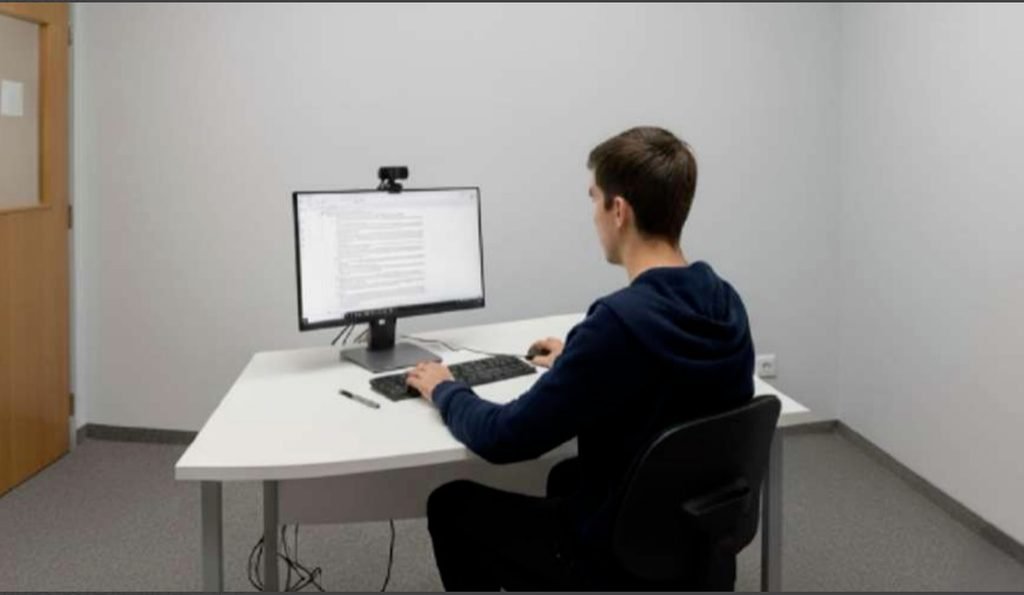
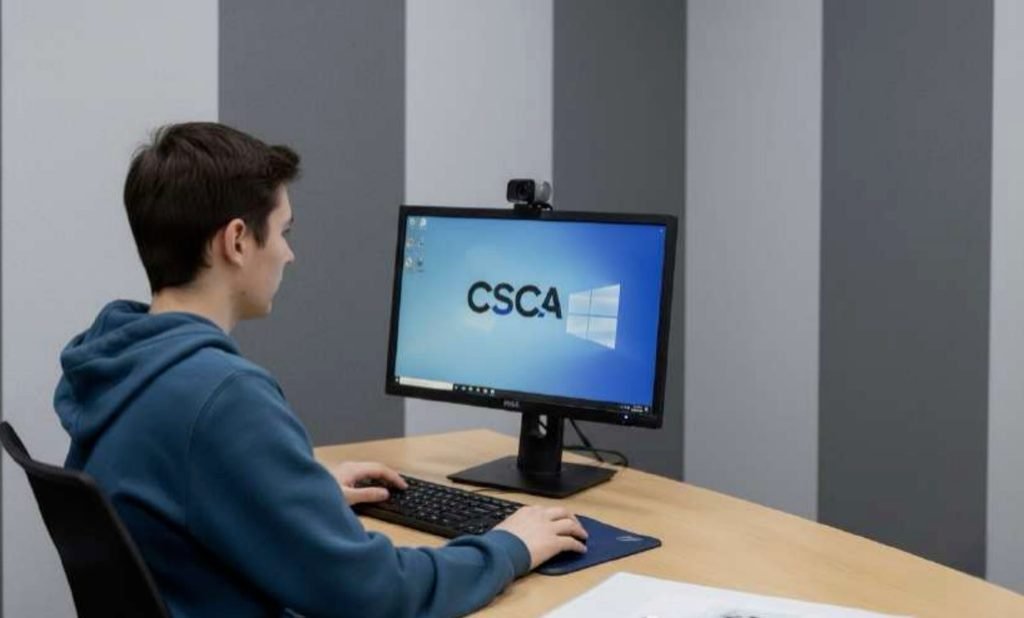
用途:从考生侧后方约 45 度角拍摄,确保全程清晰拍摄考生上半身、电脑屏幕及双手操作区域。
Purpose: Shoot from a position approximately 45 degrees behind and to the side of the examinee, ensuring that the examinee’s upper body, computer screen, and the area where their hands operate are clearly captured throughout the entire process.
- As shown
✅ 第二摄像设备
· 可为智能手机或平板
· 能安装指定监控 App
· 摄像清晰无遮挡,角度合理,画面稳定
· 电量充足,能覆盖全程考试时长
✅ 配套设备
· 稳固支架或三脚架:用于固定第二设备,避免晃动
· 充电设备或备用电源:确保第二设备不因电量耗尽而中断
✅ Second camera device
· Can be a smartphone or tablet
· Able to install the designated monitoring App
· Clear and unobstructed camera with reasonable angle and stable image
·Sufficient battery power to cover the full exam duration
✅ Supporting equipment
· Stable stand or tripod: used to fix the second device to avoid shaking
· Charging equipment or backup power supply: to ensure the second device will not be interrupted due to low battery
3. 网络连接
Network Connection
✅ 带宽要求:上下行对称带宽不低于 20Mbps
✅ 网速要求:考试系统连接网速不少于 500KB/s
✅ 连接方式:建议使用有线宽带直连;考试当天关闭所有与考试无关软件和后台程序
✅ 测速工具:登录客户端后,可使用内置测速功能验证连接质量
✅ 建议准备:备用 4G 热点,熟悉如何快速切换至手机热点
✅ Bandwidth requirement: Symmetric upstream and downstream bandwidth of no less than 20Mbps
✅ Internet speed requirement: The connection speed of the examination system should be no less than 500KB/s
✅ Connection method: It is recommended to use a wired broadband direct connection; close all software and background programs unrelated to the exam on the day of the exam
✅ Speed test tool: After logging into the client, you can use the built-in speed test function to verify the connection quality
✅ Recommended preparation: Prepare a backup 4G hotspot and be familiar with how to quickly switch to the mobile hotspot
Examination environment
考试环境
1.考试空间要求
Examination space requirements
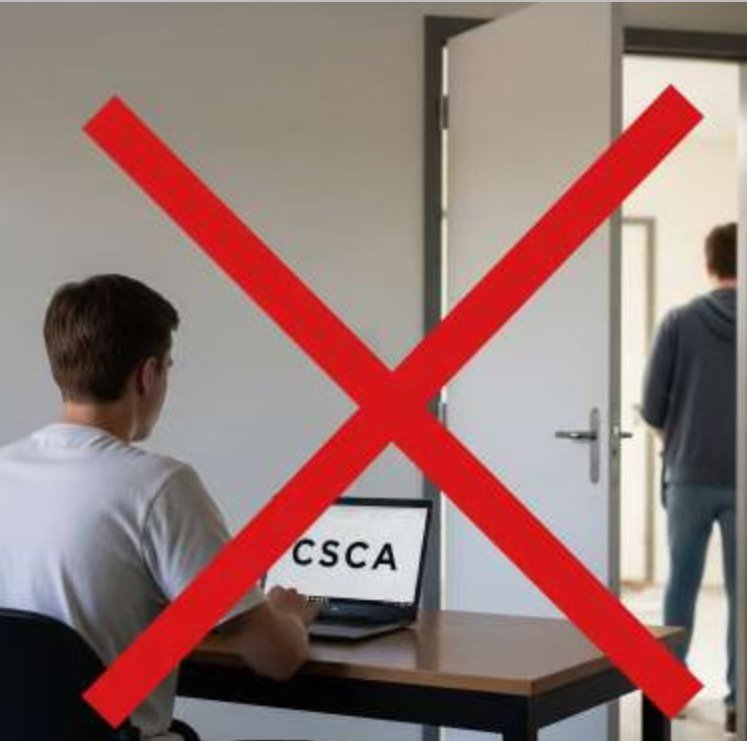
✅ 独立、安静、光线充足、无遮挡的封闭空间,考试期间禁止他人出入或打扰。
❌ 严禁在公园、网吧、餐厅、开放办公区等非封闭公共场所参加考试。
✅ An independent, quiet, well-lit, enclosed space with no obstructions. No entry or exit by others or disturbances are allowed during the exam.
❌ It is strictly prohibited to take the exam in non-enclosed public places such as parks, internet cafes, restaurants, and open office areas.
2. 桌面与设备摆放
Desktop and device placement
✅ 考生须在标准桌椅上完成考试,并将所有考试用品(如电脑、键盘、鼠标、白板、记号笔)放置于桌面。
❌ 考试环境内严禁出现手机、书籍、笔记等无关物品;严禁在床、沙发或膝盖等非标准位置作答。
✅ Candidates must complete the exam at standard desks and chairs, and place all exam supplies (such as computers, keyboards, mice, whiteboards, markers) on the desktop.
❌ It is strictly prohibited to have irrelevant items such as mobile phones, books, notes, etc. in the exam environment; it is strictly prohibited to take the exam in non-standard positions such as beds, sofas, or on one’s knees.
3. 草稿工具规范
Draft Tool Specifications
✅ 可使用小型白板或置于透明文件袋中的空白纸张,配合可擦写记号笔(铅笔、圆珠笔等不允许使用)
✅ 白板/透明文件袋中的空白纸张须在考试前后接受监考员检查,考试结束时必须当场擦除所有笔记,否则按违规处理。
❌ 禁止使用纸质草稿纸、便签或其他纸张类物品。
✅ A small whiteboard or blank paper placed in a transparent file bag can be used, along with erasable markers (pencils, ballpoint pens, etc., are not allowed).
✅ The whiteboard/blank paper in the transparent file bag must be inspected by the invigilator before and after the exam. All notes must be erased on the spot at the end of the exam; otherwise, it will be treated as a violation.
❌ The use of paper scratch paper, sticky notes, or other paper-based items is prohibited.

4. 主机位要求
Host bit requirements
✅ 主机位须使用笔记本电脑内置摄像头,或置于屏幕正上方、正对考生的外接 USB 摄像头。
✅ 确保摄像头能清晰采集到考生完整的正面面部与肩部。
✅ 考生须全程正面免冠面向摄像头,确保考试环境光线均匀、背景简洁,且考试期间无他人进入。
✅ 考试全程不得以任何方式移动、遮挡或关闭主机位摄像头。
❌ 摄像头角度过高/过低、画面仅包含局部面部、侧身或背对镜头等。
✅ The main camera must use the built-in webcam of a laptop, or an external USB camera placed directly above the screen and facing the candidate.
✅ Ensure the camera can clearly capture the candidate’s entire front face and shoulders.
✅ Candidates must face the camera directly without headgear throughout the exam. Ensure even lighting, a simple background in the exam environment, and no other people entering during the exam.
✅ The main camera must not be moved, blocked, or turned off in any way during the entire exam.
❌ Incorrect setups include: camera angle too high/too low, frame showing only part of the face, candidate standing sideways or with their back to the camera, etc.
Examination Rules
考试规则
1. 考前测试与准备
Pre-exam Tests and Preparation
· 平台测试:考生须在考前按通知完成考试系统与设备的平台测试,验证客户端、摄像头、麦克风及网络环境是否符合要求。 未完成测试者,考试当天可能无法顺利进入系统。
· 集中模拟测试:强烈建议考生参加集中模拟测试,以便提前发现技术或设备问题,熟悉考试流程 ,确保正式考试顺利进行、提升整体应试效率。
· Platform testing: Candidates must complete the platform testing of the examination system and equipment as per the notification before the exam to verify whether the client, camera, microphone, and network environment meet the requirements. Those who fail to complete the testing may not be able to enter the system smoothly on the exam day.
· Concentrated simulation test: It is strongly recommended that candidates participate in the concentrated simulation test to identify technical or equipment issues in advance, familiarize themselves with the exam procedures, ensure the smooth conduct of the formal exam, and improve the overall exam-taking efficiency.
2. 登录与核验时限
Login and verification time limit
考生须在开考前 30-60 分钟登录系统并完成设备调试,开考后未完成登录和验证的考生将无法进入考试。
Candidates must log in to the system and complete equipment debugging 30-60 minutes before the exam starts. Candidates who fail to complete login and verification after the exam starts will not be able to enter the exam.
3. 身份验证
Authentication
· 考生须凭准考证号与密码登录考试系统。
· 考生必须通过人脸识别及有效身份证件原件的在线核验,且证件信息须与准考证信息完全一致。
·
Candidates must log in to the examination system using their admission ticket number and password.
· Candidates must pass the online verification of face recognition and valid original identity documents, and the document information must be completely consistent with the admission ticket information.
4. 监控要求
Monitoring requirements
· 全程开启:主、副机位摄像头、麦克风须全程开启,不得以任何形式遮挡或关闭。
· 画面质量:画面须清晰、光线充足,能清楚辨识考生面部特征与动作。
· 拍摄角度:主机位应拍摄考生正面上半身。副机位应置于考生侧后方45°角,完整覆盖考生侧脸、肩膀、手臂、双手及主机位屏幕。
· 声音监控:麦克风须正常收音,用于采集环境音。
· 设备状态:副机位设备须保持稳定供电,退出所有非必要应用, 并开启“勿扰模式”,同时使用“飞行模式 + Wi-Fi”设置(先开启飞行模式,再手动连接 Wi-Fi),以杜绝干扰。
· Full-time activation: The main and secondary cameras and microphones must be turned on throughout the exam and must not be covered or turned off in any form.
· Image quality: The image must be clear and well-lit, allowing clear identification of the candidate’s facial features and movements.
· Shooting angle: The main camera shall capture the candidate’s front upper body. The secondary camera shall be placed at a 45° angle behind the candidate’s side, fully covering the candidate’s side face, shoulders, arms, hands, and the main device screen.
· Audio monitoring: The microphone must function properly to capture ambient sound.
· Device status: The secondary device must maintain stable power, close all non-essential applications, enable Do Not Disturb mode, and use “Airplane Mode + Wi‑Fi” (turn on Airplane Mode first, then connect to Wi‑Fi manually) to avoid interference.
5. 考试纪律
Examination discipline
· 设备与软件:禁止切屏、多屏显示、运行非考试程序、远程控制及屏幕共享;严禁使用任何类型的无线耳机。
· 行为规范:考试全程不得离席、与他人交流,不得佩戴饰物遮挡面部;必须始终保持在监考画面内。
· 诚信与保密:严禁任何形式的作弊行为。不得以任何形式泄露、记录、传播试题与答案;不得寻求或提供任何外部帮助。
· 交卷规则:考试时间结束时系统将自动收卷,考生不得提前交卷。
重要提示:考生须服从监考员的一切指令。完整规定请参阅《考生须知与声明》与《诚信考试承诺书》。
· Devices & Software: Screen switching, multi-display, non-exam applications, remote control and screen sharing are prohibited. Wireless earphones/headphones of any kind are strictly forbidden.
· Behavior Rules: Candidates must not leave the seat, communicate with others or wear accessories that cover the face during the exam. They must remain within the invigilation camera view at all times.
· Integrity & Confidentiality: Any form of cheating is strictly prohibited. Exam questions and answers must not be leaked, recorded or distributed in any way. Candidates must not seek or provide external assistance.
· Submission Rules: The system will automatically submit the paper when the exam time ends. Early submission is not allowed.
Important Note: Candidates must follow all invigilators’ instructions. For complete regulations, please refer to the Examination Guidelines & Statement and Honor Code for Examination.
6. 违规处理
Violation handling
违规行为一经查实,将根据情节严重程度给予以下处理:
• 情节较轻:取消当次考试成绩。
• 情节较重:取消当次考试成绩,且自违规之日起两年内不得再次报考。
• 情节严重:取消所有历史成绩,并终身禁止参加 CSCA 考试。
• 情节特别严重:可能将移交至司法机关依法处理,并影响在华留学资格及签证申请。
Once a violation is verified, the following penalties will be imposed based on the severity of the circumstances:
• Minor circumstances: The results of the current exam will be cancelled.
• More serious circumstances: The results of the current exam will be cancelled, and the violator will be prohibited from re-registering for the exam for two years from the date of the violation.
• Serious circumstances: All historical scores will be cancelled, and the violator will be permanently prohibited from taking the CSCA exam.
• Especially serious circumstances: The case may be transferred to judicial authorities for handling in accordance with the law, and it will affect the eligibility for studying in China and visa applications.
Exam Day Schedule
考试日流程
1. 考前准备(考前 30–60 分钟)
Exam preparation (30–60 minutes before the exam)
· 主机位(答题电脑):退出杀毒软件及所有非考试软件; 检查网络稳定性,建议使用有线网络;保持电量充足(建议接通电源)。
· 副机位(监控手机/平板):开启监考 App,固定在侧后方 45°角,确保画面覆盖考生上半身、电脑屏幕及双手;开启飞行模式后连接 Wi-Fi,并开启勿扰或静音模式,关闭所有无关应用;保持电量充足(建议接通电源)。
· 必备物品:将身份证件原件和准考证放在桌面备查。
· Host device (examination computer): Exit antivirus software and all non-examination software; check network stability, it is recommended to use a wired network; keep sufficient power (it is recommended to connect to a power source).
· Secondary device (monitoring mobile phone/tablet): Open the invigilation App, fix it at a 45° angle to the side and rear, ensuring that the screen covers the examinee’s upper body, computer screen and hands; enable flight mode, then connect to Wi-Fi, and enable Do Not Disturb or silent mode, close all irrelevant applications; keep sufficient power (it is recommended to connect to a power source).
· Essential items: Place the original ID card and admission ticket on the desktop for inspection.
2. 登录与核验
Login and Verification
· 启动与检测:打开考试客户端,选择语言,按指引完成系统与网络检测。
· 登录与人脸识别:输入准考证号与密码登录,确认身份信息后完成人脸识别。
· 连接副机位:扫描屏幕二维码或输入账号,登录副机位监考 App,确保画面通畅。
· 配合检查:按监考员指令展示证件、进行 360°环境环拍,并出示空白草稿工具。
· 阅读考试须知:仔细阅读系统显示的《诚信考试承诺书》并点击确认按钮。
· Startup and detection: Open the exam client, select the language, and complete system and network detection according to the guidelines.
· Login and face recognition: Enter the admission ticket number and password to log in, confirm the identity information, and complete face recognition.
· Connect to the secondary camera: Scan the QR code on the screen or enter the account number to log in to the secondary camera invigilation App, ensuring the screen is clear.
· Cooperate with the inspection: Show your certificate, take a 360° environmental video tour, and present blank draft tools as instructed by the invigilator.
· Read the exam instructions: Carefully read the “Integrity Exam Commitment” displayed on the system and click the confirm button.
3. 开考并作答
Start the exam and answer the questions
· 进入考试:倒计时结束并确认同意后,系统自动进入全屏答题界面,考试计时同步启动。
· 答题与保存:使用鼠标直接作答,系统自动保存答题进度。请留意左侧题号颜色(绿色为已作答),并自行核查是否完成所有题目。
· 时间管理:可在考试时间内返回修改已答题目,请合理分配时间。
· 异常处理:如遇网络中断,重新登录后可继续作答,系统将保留原有进度;若遇其他技术问题,请求助监考老师。
·
Entering the exam: After the countdown ends and you confirm your agreement, the system will automatically enter the
full-screen answer interface, and the exam timer will start simultaneously.
· Answering and saving: Use the mouse to answer directly, and the system will automatically save the progress of your answers. Please pay attention to the color of the question numbers on the left (green indicates answered) and check by yourself whether all questions have been completed.
· Time management: You can go back to modify the answered questions within the exam time; please allocate your time reasonably.
· Abnormality handling: In case of network interruption, you can continue answering after re-logging in, and the system will retain the original progress; if you encounter other technical problems, please ask the invigilator for help.
4. 考试结束
The exam is over
请勿重复填写
• 时间结束系统自动收卷,请看到“交卷成功”提示后再退出。
• 按监考员指令展示并当场擦除草稿工具内容。
• 退出考试系统,暂不删除客户端文件,待成绩公布。
Do not fill in repeatedly
• The system will automatically collect the papers when the time is up. Please exit only after seeing the prompt “Submission successful”.
• Show and erase the contents of the draft tools on the spot according to the invigilator’s instructions.
• Exit the exam system, do not delete the client files for the time being, and wait for the announcement of results.
Grades and Reports
成绩与报告
1. 成绩公布
Announcement of results
考试成绩通常在考试结束后 7 个工作日内公布。请登录 CSCA 官方报名网站查询并下载电子版成绩报告。如有特殊情况导致延迟,将在官网发布公告。
Exam results are usually announced within 7 working days after the exam. Please log in to the official registration website of CSCA to check and download the electronic score report. If there is a delay due to special circumstances, an announcement will be posted on the official website.
2. 成绩效力
Validity of grades
· 用途:该成绩是申请中国高校本科录取的重要参考依据,同时也是中国政府奖学金评审的必备申请材料。
· 有效期:自证书发布之日起 2 年内有效。
· Purpose: This score is an important reference for applying for undergraduate admission to Chinese universities, and it is also a necessary application material for the evaluation of Chinese Government Scholarships.
· Validity period: Valid for 2 years from the date of issuance of the certificate.
常见问题
Frequently Asked Questions
Registration and Qualification
报名与资格
1. 哪些人可以报考 CSCA?
答:CSCA 专为计划申请中国大陆高校本科课程的非中国籍学生设计,持中国护照或港澳台居民居住证者不可报考。
1. Who can apply for CSCA?
Answer: CSCA is designed specifically for non-Chinese students planning to apply for undergraduate programs at universities in the Mainland Chinese. Those holding Chinese passports or residence permits for Hong Kong, Macao, and Taiwan residents are not eligible to apply.
2. 报名是否有年龄限制?
答:没有年龄限制,但 14 周岁以下考生必须由监护人同意并协助完成报名。
2. Is there an age limit for registration?
Answer: There is no age limit, but candidates under the age of 14 must have the consent of their guardians and be assisted by them to complete the registration.
3. 如何报名?
答:考生需在 CSCA 官网注册账号、填写信息并完成缴费,收到确认邮件即报名成功。
3. How to register?
Answer: Candidates need to register an account on the CSCA official website, fill in the information and complete the payment. The registration is successful upon receiving the confirmation email.
4. 报名时需要准备什么?
答:建议考生在报名前准备好以下材料和信息:
1. 长期有效的电子邮箱(用于接收确认邮件和通知);
2. 有效身份证件(如护照)
3. 二寸电子证件照
4. 信用卡信息(支持 Visa、Mastercard 国际信用卡,用于在线支付考试费用)
4. What do I need to prepare for registration?
Answer: It is recommended that candidates prepare the following materials and information before registering:
1. A long-term valid email address (for receiving confirmation emails and notifications);
2. Valid identification documents (such as a passport)
3. A 2-inch electronic ID photo
4. Credit card information (supporting Visa, Mastercard international credit cards, for online payment of exam fees)
5. 报名必须要用护照吗?如果我的护照即将过期怎么办?
答:护照不是唯一可接受的证件,但它是国际考生最通用的身份证明。
如果您的护照即将过期,我们强烈建议您尽快办理更新。您必须确保在考试当天所出示的证件是有效的。过期证件将导致您无法进入考场。
5. Do I have to use a passport to register? What if my passport is about to expire?
Answer: A passport is not the only acceptable document, but it is the most commonly used form of identification for international candidates.
If your passport is about to expire, we strongly recommend that you renew it as soon as possible. You must ensure that the document you present on the test day is valid. An expired document will prevent you from entering the test center.
6. 我该如何选择报考的科目?
答:您的科目选择应主要取决于您计划申请的大学和专业的要求。我们建议您提前查阅目标院校的招生简章,了解其对 CSCA 考试科目的具体建议或要求。
6. How should I choose the subjects to apply for?
Answer: Your subject selection should mainly depend on the requirements of the university and major you plan to apply for. We recommend that you check the admission brochures of your target institutions in advance to understand their specific suggestions or requirements for the CSCA exam subjects.
7. 每次考试最多可以报考几门科目?
答:目前没有报考数量限制,建议考生根据自身备考情况和目标院校要求合理选择科目。
7. What is the maximum number of subjects that can be registered for each exam?
Answer: Currently, there is no limit on the number of subjects that can be registered for. It is recommended that candidates reasonably choose subjects based on their own preparation status and the requirements of their target institutions.
8. 不同的科目可以选择不同的考试语言吗?
答:可以。对于基础科目(数学、物理、化学),您可以为每个科目单独选择用中文或英文进行考试。 而专业中文的所有科目仅提供中文考试。
最终考试语言以申请院校的要求为准;如院校无明确要求,考生可自行选择。
8. Can different subjects choose different examination languages?
Answer: Yes. For basic subjects (Mathematics, Physics, Chemistry), you can choose to take the exam in Chinese or English for each subject individually. All subjects in Professional Chinese are only available in Chinese.
The final examination language is subject to the requirements of the applying institution; if the institution has no clear requirements, candidates can choose by themselves.
9. 提交报名后,我还能修改报名信息吗?
答:报名信息一经提交即被锁定,考生不能在系统中自行修改。如需更正,考生必须在准考证生成前提交信息更正申请。准考证生成后,所有信息均不得修改。
9. After submitting the registration, can I still modify the registration information?
Answer: Once the registration information is submitted, it will be locked, and candidates cannot modify it by themselves in the system. If correction is needed, candidates must submit an application for information correction before the admission ticket is generated. After the admission ticket is generated, all information cannot be modified.
10. 能否转考或退考?
答:目前不可转考。考生须在准考证发放前提交退考申请;准考证生成后不再接受退考。
10. Can I transfer my exam or withdraw from it?
Answer: Currently, only withdrawal is supported, and exam transfer is not allowed. Candidates must submit a withdrawal application before the admission ticket is issued; no withdrawal applications will be accepted after the admission ticket is generated.
11. 我可以多次参加 CSCA 考试吗?有次数限制吗?
答:可以。CSCA 不限制考试次数,考生可多次报考。成绩有效期为两年。在申请时,考生通常可以提交有效期内的最佳成绩,但具体要求以目标院校政策为准。
11. Can I take the CSCA exam multiple times? Is there a limit on the number of attempts?
Answer: Yes. CSCA does not limit the number of exam attempts, and candidates can register for the exam multiple times. The score is valid for two years. When applying, candidates can usually submit their best valid score, but the specific requirements are subject to the policies of the target institution.
12. 我所在城市有线下考点,还可以申请居家网考吗?
答:不可以。居家网考仅面向条件暂不具备集中机考或纸笔考的国家/地区开放。
12. There is an offline test center in the city where I live. Can I still apply for the home-based online test?
Answer: No. The home-based online test is only available to countries/regions that do not currently have the conditions for centralized computer-based tests or paper-based tests.
13. 准考证什么时候可以下载?
答:准考证将于考试前在报名系统开放下载,考生可登录系统自行打印。
系统开放下载时,会同步向考生注册邮箱发送通知邮件。
13. When can I download the admission ticket?
Answer: The admission ticket will be available for download in the registration system before the exam. Candidates can log in to the system to print it by themselves.
When the system opens for download, a notification email will be sent to the candidate’s registered email address simultaneously.
14. 准考证上包含哪些信息?
答:准考证会显示考生姓名、性别、国籍、准考证号、证件类型与号码、考试时间、考试科目、考点名称与地址、考场和座位号,以及考生须知等。
14. What information is included on the admission ticket?
Answer: The admission ticket will display the examinee’s name, gender, nationality, admission ticket number, type and number of identification document, exam time, exam subjects, name and address of the exam venue, examination room and seat number, as well as examinee instructions, etc.
15. 准考证信息有误怎么办?
答:准考证信息生成后不能修改。信息与证件不符将导致无法入场。请务必在报名时仔细核对,并在下载准考证后再次确认。
15. What should I do if there is an error in the admission ticket information?
Answer: The admission ticket information cannot be modified once generated. If the information does not match the documents, you will not be able to enter the venue. Please be sure to carefully check the information when registering and confirm it again after downloading the admission ticket.
Preparation before the exam
考前准备
16. 参加居家网考需要准备哪些设备?
答:考生需准备一台符合要求的电脑(主机位)和一部手机/平板(副机位)。居家网考要求双机位监控,主机位用于答题及正面监控,副机位从考生侧后方 45°角拍摄全程。 具体设备要求和副机位摆放细节请参见“设备与网络要求”
16. What equipment is needed for taking the home online exam?
Answer: Candidates need to prepare a computer that meets the requirements (main device) and a mobile phone/tablet (secondary device). The home online exam requires dual-device monitoring. The main device is used for answering questions and front-facing monitoring, while the secondary device films the entire process from a 45° angle behind and to the side of the candidate. For specific equipment requirements and details on placing the secondary device, please refer to “Equipment and Network Requirements”.
17. 网络速度和稳定性有什么要求?
答:居家网考要求上下行对称带宽不低于 20Mbps,系统连接网速不少于 500KB/s,建议使用有线宽带直连,并在考试当天关闭所有无关软件和后台程序。 考生可在客户端内使用测速功能验证连接质量,同时建议准备备用 4G 热点,以便网络异常时快速切换。
17. What are the requirements for network speed and stability?
Answer: The home online exam requires symmetric upload and download bandwidth of no less than 20Mbps, and the system connection speed of no less than 500KB/s. It is recommended to use a wired broadband direct connection and close all irrelevant software and background programs on the exam day. Candidates can use the speed test function in the client to verify the connection quality, and it is also recommended to prepare a backup 4G hotspot for quick switching in case of network abnormalities.
18. 考试环境需要怎样布置?
答:考生必须在独立、安静、光线充足的封闭空间完成考试,桌面保持整洁。禁止在床、沙发等非标准位置答题。具体布置要求详见“考试环境布置”。
18. How should the examination environment be arranged?
Answer: Candidates must complete the exam in an independent, quiet, well-lit, and enclosed space, with the desk kept tidy. Answering questions in non-standard locations such as beds and sofas is prohibited. For specific arrangement requirements, please refer to “Examination Environment Arrangement”.
19. 居家网考允许使用草稿纸吗?
答: 不允许使用传统的纸质草稿纸、便签等纸张类物品。但是,您可以使用以下指定的草稿工具:
• 小型白板,配合可擦写记号笔。
• 或将一张纸置于透明文件袋中,同样使用可擦写记号笔在文件袋表面书写。
19. Is scratch paper allowed for the home online exam?
Answer: Traditional paper-based scratch paper, sticky notes, and other paper items are not allowed. However, you can use the following designated scratch tools:
• A small whiteboard with an erasable marker.
• Or place a piece of paper in a transparent file bag and use an erasable marker to write on the surface of the file bag.
20. 考试前需要安装什么软件?
答:主机位电脑需提前安装 CSCA 指定考试客户端,副机位手机/平板需安装监控 App。 具体安装指南及下载链接将通过 CSCA 官方报名系统和考生注册邮箱同步发布,请务必注意查收并提前完成安装。
20. What software needs to be installed before the exam?
Answer: The computer used as the main机位 (host position) needs to have the CSCA-specified exam client installed in advance, and the mobile phone/tablet used as the secondary机位 needs to have the monitoring App installed. The specific installation guide and download link will be released simultaneously through the official CSCA registration system and the candidate’s registered email. Please be sure to check and complete the installation in advance.
21. 在安装软件过程中遇到问题怎么办?
答:若遇到安装问题,建议您:
1. 优先自查:请首先查阅官方提供的操作指南与常见问题解答,按步骤排查。
2. 寻求支持:若问题仍在,您可以在平台测试开放期间进入技术支持会议室,获得一对一协助;或通过官方客服提交问题截图,我们将尽快为您解答。
21. What should I do if I encounter problems during the software installation process?
Answer: If you encounter installation issues, we recommend that you:
1. Prioritize self-check: First, please refer to the official operation guide and frequently asked questions, and troubleshoot step by step.
2. Seek support: If the problem persists, you can enter the technical support conference room during the platform testing and opening period to get one-on-one assistance; or submit a screenshot of the problem through the official customer service, and we will answer you as soon as possible.
22. 正式考试前有平台测试或模拟测试吗?
答:有。我们强烈建议您务必参加以下两项考前关键环节:
· 平台测试:用于验证您的设备与网络等基础环境是否符合考试要求。
· 集中模拟测试:将完整模拟真实考试的全流程,是您提前熟悉操作、排查潜在问题的深度演练。
22. Is there a platform test or mock test before the official exam?
Answer: Yes. We strongly recommend that you must participate in the following two key pre-exam环节:
· Platform test: Used to verify whether your equipment, network and other basic environments meet the exam requirements.
· Concentrated mock test: It will fully simulate the entire process of the real exam, and is an in-depth drill for you to familiarize yourself with the operations in advance and identify potential problems.
Process and Rules on the Exam Day
考试当天流程与规则
23. 我需要提前多久进入考试系统?迟到还能参加考试吗?
答:考生可在考试开始前 60 分钟起登录考试系统,完成设备检测、人脸识别与身份验证。考试正式开始后将禁止进入考试系统。
23. How long in advance do I need to enter the exam system? Can I still take the exam if I am late?
Answer: Candidates can log in to the exam system 60 minutes before the start of the exam to complete equipment inspection, face recognition, and identity verification. Entry into the exam system will be prohibited once the exam officially starts.
24. 考试当天需要携带哪些物品?
答:考试当天,考生须准备以下物品:
1. 有效身份证件原件;
2. 纸质准考证;
3. 小型白板/置于透明文件袋中的纸张与可擦写记号笔。具体要求请参见“考试环境布置”。
24. What items need to be brought on the exam day?
Answer: On the exam day, candidates must prepare the following items:
1. Original valid ID document;
2. Paper admission ticket;
3. A small whiteboard/ paper placed in a transparent file bag and erasable markers. For specific requirements, please refer to “Examination Environment Arrangement”.
25. 考试当天忘带准考证或身份证件怎么办?
答:准考证包含考试登录所需的账号和密码,身份证件则用于身份核验。若缺少纸质准考证,您将无法登录系统参加考试;若缺少有效身份证件,则无法通过身份核验进入考试。无论缺少哪一项,均视为缺考,考试费用不予退还。请务必提前准备,避免因遗漏错过考试。
25. What should I do if I forget to bring my admission ticket or ID card on the exam day?
Answer: The admission ticket contains the account number and password required for logging into the exam system, and the ID card is used for identity verification. If you lack a paper admission ticket, you will not be able to log into the system to take the exam; if you lack a valid ID card, you will not be able to pass the identity verification to enter the exam. If you are missing either of them, it will be regarded as an absence, and the exam fee will not be refunded. Please be sure to prepare in advance to avoid missing the exam due to omission.
26. 我能用电子版身份证件进行身份核验吗?
答:不能。居家网考身份核验必须使用有效身份证件原件,电子版或复印件均不被接受。
26. Can I use an electronic version of my ID for identity verification?
Answer: No. For identity verification in the home online exam, a valid original ID document must be used. Electronic versions or copies are not accepted.
27. 如果在考试中遇到技术问题该怎么办?
您可以通过考试客户端或者监考 App 呼叫监考老师寻求帮助。技术支持团队和监考员会提供远程协助。
27. What should I do if I encounter technical problems during the exam?
You can call the invigilator for help through the exam client or the invigilation App. The technical support team and invigilators will provide remote assistance.
28. 考试过程中可以提前交卷吗?
答:不可以。所有考生须在规定考试时间内完成作答,考试结束后系统会统一收卷。 除突发健康或紧急情况经主考批准外,提前交卷或擅自离场均视为违规。
28. Can I hand in my exam paper in advance during the exam?
Answer: No. All candidates must complete their answers within the specified exam time, and the system will collect all papers uniformly after the exam ends. Except for sudden health or emergency situations approved by the invigilator, handing in the paper in advance or leaving the venue without permission will be regarded as a violation.
Exam results
考试成绩
29. 成绩什么时候公布?
答:考试结束后 7 个工作日内公布。如有特殊情况导致延迟,将在官网发布公告。
29. When will the results be announced?
Answer: They will be announced within 7 working days after the exam. If there is a delay due to special circumstances, an announcement will be posted on the official website.
30. 如何获取和寄送成绩单?
答:成绩公布后,考生可登录 CSCA 官方报名网站下载电子版成绩报告。
该电子报告为官方正式文件,所有认可 CSCA 成绩的院校均接受此版本,无需额外申请寄送,考生可直接提交给申请院校。
30. How to obtain and send transcripts?
Answer: After the scores are announced, candidates can log in to the official CSCA registration website to download the electronic score report.
This electronic report is an official formal document, and all institutions that recognize CSCA scores accept this version. There is no need to apply for additional delivery; candidates can directly submit it to the institutions they are applying to.
31. 中国高校如何使用 CSCA 成绩?
答:认可 CSCA 成绩的高校在招生审核时,可通过官方系统核验成绩单真伪,并同步查看该成绩在全球考生中的百分位排名。这一排名有助招生官直观了解申请者的全球学术竞争力,并结合本校标准进行综合评估。
31. How do Chinese universities use CSCA scores?
Answer: Universities that recognize CSCA scores can verify the authenticity of transcripts through the official system during the admission review process and simultaneously check the percentile ranking of the scores among global candidates. This ranking helps admission officers intuitively understand the global academic competitiveness of applicants and conduct a comprehensive evaluation in conjunction with the university’s own standards.